


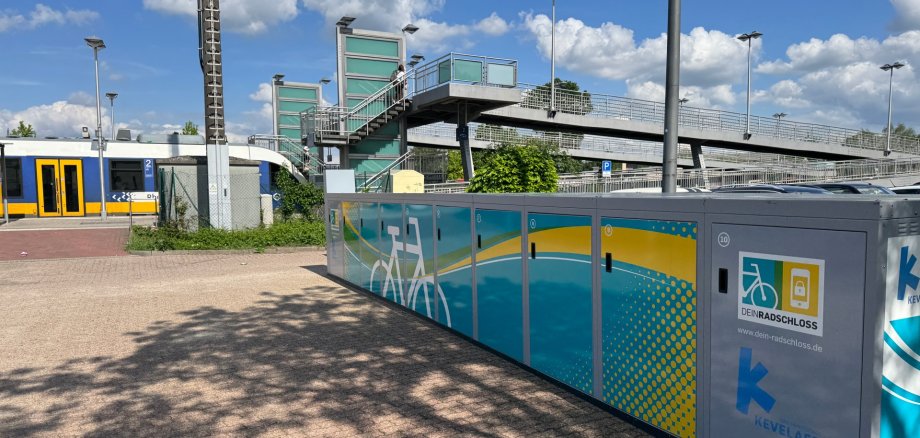
New, lockable bike boxes are now available at Kevelaer station. With this offer, the pilgrimage town is expanding its bicycle infrastructure in a targeted manner and making the switch to bus and train even more convenient.
A total of 20 bike boxes have been set up on both sides of the tracks around the station. They offer secure and weather-protected parking - especially for commuters and schoolchildren who regularly combine cycling with public transport.
Part of a larger expansion
In addition to the new bike boxes, the Bike+Ride facility has also been extensively expanded. With additional bicycle parking spaces and improved services, the city is consistently developing the location into a modern, multimodal transport hub. The total cost of the measure is around 300,000 euros. 89 percent is being funded by the Rhine-Ruhr Transport Association (VRR) as part of the program for investment measures in local public transport.
"With the new bike boxes, we are creating an offer that makes everyday life easier for many people," explains Mayor Dr. Dominik Pichler. "If you can park your bike safely, you are more likely to use it regularly. This is exactly what we want to support - mobility that is practical and at the same time protects our environment."
As part of the expansion, the bypass around the station parking lot was permanently closed in order to avoid dangerous situations and enable users to use it safely.
Easy to use via DeinRadschloss
The bike boxes are provided via the "DeinRadschloss" booking system of the Verkehrsverbund Rhein-Ruhr (VRR) and can be reserved flexibly online. Users benefit from easy handling and reliable parking options directly at the station. A one-off registration at www.dein-radschloss.de is required to use the bike boxes. All DeinRadschloss parking spaces in the VRR area can then be booked and used. There are standardized usage fees for the DeinRadschloss facilities.
A contribution to sustainable mobility
With the expansion, the pilgrimage town of Kevelaer is consistently continuing on its path towards sustainable and networked mobility. Secure bicycle parking facilities play an important role here: they are often the decisive factor in whether people integrate bicycles into their everyday lives - especially in combination with buses and trains.