


City administration building of the Stadtkevelaer

Council & Committees

A successful start: the new city council takes up its work

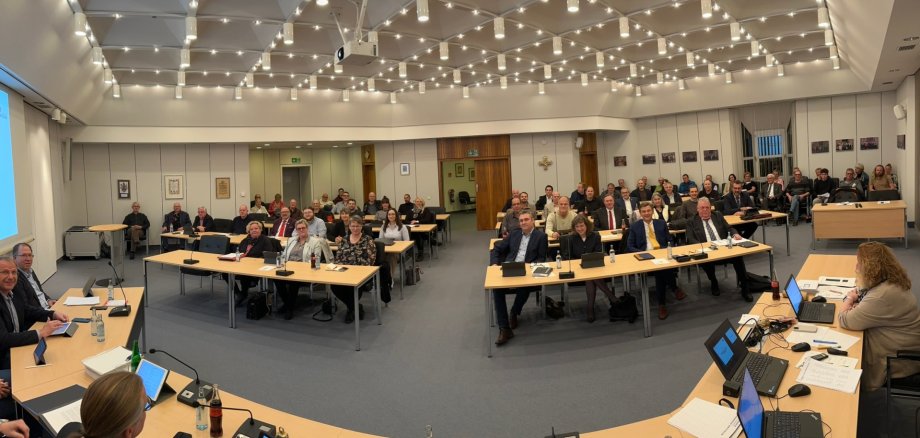
On Tuesday, November 4, the newly elected Kevelaerer City Council met for the first time .

Many new faces

With 42 seats, the city council is now larger than ever before. The composition has also become more diverse - a sign of democracy in action and a broad commitment to our pilgrimage city.

Elections and appointments

The deputy mayors and local councillors were elected during the meeting:

Deputy Mayor:

  1. Dr. Jutta Bückendorf
  2. Hubert van Meegen
  3. Johannes Georg Knechten

Our local leader:

  • Peter Hohl - Kevelaer
  • Martin Brandts - Kervenheim
  • Johanna Ambrosius - Kleinkevelaer
  • Paul Schaffers - Twisteden
  • Guido Küppers - Betting
  • Erich Reiser - Winnekendonk

In addition, our mayor Dr. Dominik Pichler was officially inaugurated for his third term of office.

Congratulations to all those elected

We would like to congratulate all elected and re-elected members and wish them a successful and constructive term of office! We look forward to working together in the new city council and would like to thank all those who have committed their time, passion and sense of responsibility to Kevelaer.

Further information

You can find all the details about our City Council, the elected representatives and the current issues at any time in our Council information system.

No employees found.

Help with accessibility

  • General

    We endeavor to make our websites accessible. You can find details on this in our accessibility statement. You can send us suggestions for improvement via our feedback form Report accessibility.

  • Font size

    To adjust the font size, please use the following key combinations:

    Larger

    ⌘command
    +

    Smaller

    ⌘command

    Larger

    Ctrl
    +

    Smaller

    Ctrl
  • Keyboard navigation

    Use TAB and SHIFT + TAB to navigate through next/previous links, form elements and buttons.

    Use ENTER to open links and interact with elements.

  • Contrast mode

    Press the following key combination to reduce or increase the contrast:

    Enlarge

    ⌃control
    ⌥option
    ⌘command
    .

    Decrease

    ⌃control
    ⌥option
    ⌘command
    ,
    Note: The shortcuts must be activated in the system settings of the operating system.

    Press the left ALT key + left SHIFT key + PRINT to quickly switch the high contrast mode on or off.

  • Invert colors

    Press the following key combination to switch the color inversion on and off:

    ⌃control
    ⌥option
    ⌘command
    8
    Note: The shortcuts must be activated in the system settings of the operating system.

    First activate the screen magnifier and then switch the color inversion on and off with the following key combinations:

    1. screen magnifier

    +

    2. invert colors

    Ctrl
    Old
    I
  • Screen magnifier

    Press the following key combinations to use the screen magnifier:

    Switch on/off

    ⌥option
    ⌘command
    8

    Enlarge view

    ⌥option
    ⌘command
    =

    Reduce view

    ⌥option
    ⌘command
    Note: The shortcuts must be activated in the system settings of the operating system.

    Switch on / Enlarge view

    +

    Reduce view