


City administration building of the Stadtkevelaer

Job center

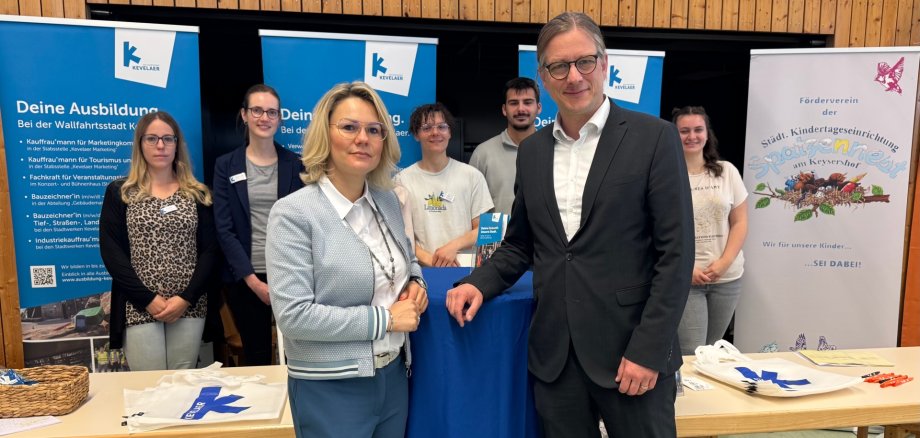
Training and job fair in Kevelaer attracts large crowds and offers personal insights

The training and job fair in the double sports hall of the Kevelaer school center was once again a complete success this year. On Friday, April 4, hundreds of pupils took the opportunity to talk to regional companies, universities and institutions and find out about training and career opportunities.

For the first time, the fair was organized by the Youth Employment Agency, a cooperation between the Employment Agency, the district of Kleve and the Kevelaer Job Centre. The aim is to provide young people with even more targeted support during the transition from school to work.

Mayor Dominik Pichler and Carina Cleven-Pawletko, Head of the Job Center and Migration Department at the district of Kleve, opened the event. "The training and job fair is a real success. It brings young people into direct contact with their professional future," said Pichler. Cleven-Pawletko added: "So many interested faces, so many committed exhibitors - that shows how lively and important career guidance is in the region."

A wide range of training and study opportunities were represented - from skilled trades to social and nursing professions to the police and armed forces.

Thorsten Stern, Deputy Head of Job Placement at the Kevelaer Job Centre and main organizer of the fair, was completely satisfied: "It was impressive to see how committed and curious the young people were when they approached the exhibitors. Personal contact makes all the difference - and that's exactly what this fair is for."

The response from companies and visitors was consistently positive - a strong sign of the good cooperation between schools, companies and the partners of the youth employment agency.

No employees found.

Help with accessibility

  • General

    We endeavor to make our websites accessible. You can find details on this in our accessibility statement. You can send us suggestions for improvement via our feedback form Report accessibility.

  • Font size

    To adjust the font size, please use the following key combinations:

    Larger

    ⌘command
    +

    Smaller

    ⌘command

    Larger

    Ctrl
    +

    Smaller

    Ctrl
  • Keyboard navigation

    Use TAB and SHIFT + TAB to navigate through next/previous links, form elements and buttons.

    Use ENTER to open links and interact with elements.

  • Contrast mode

    Press the following key combination to reduce or increase the contrast:

    Enlarge

    ⌃control
    ⌥option
    ⌘command
    .

    Decrease

    ⌃control
    ⌥option
    ⌘command
    ,
    Note: The shortcuts must be activated in the system settings of the operating system.

    Press the left ALT key + left SHIFT key + PRINT to quickly switch the high contrast mode on or off.

  • Invert colors

    Press the following key combination to switch the color inversion on and off:

    ⌃control
    ⌥option
    ⌘command
    8
    Note: The shortcuts must be activated in the system settings of the operating system.

    First activate the screen magnifier and then switch the color inversion on and off with the following key combinations:

    1. screen magnifier

    +

    2. invert colors

    Ctrl
    Old
    I
  • Screen magnifier

    Press the following key combinations to use the screen magnifier:

    Switch on/off

    ⌥option
    ⌘command
    8

    Enlarge view

    ⌥option
    ⌘command
    =

    Reduce view

    ⌥option
    ⌘command
    Note: The shortcuts must be activated in the system settings of the operating system.

    Switch on / Enlarge view

    +

    Reduce view