
City administration building of the Stadtkevelaer
> Translation notice: This page has been automatically translated with the support of DeepL. Differences from the original German text may occur. Only the German version is legally binding.

Equality

Successful Self-Defense Class for Girls in Kevelaer

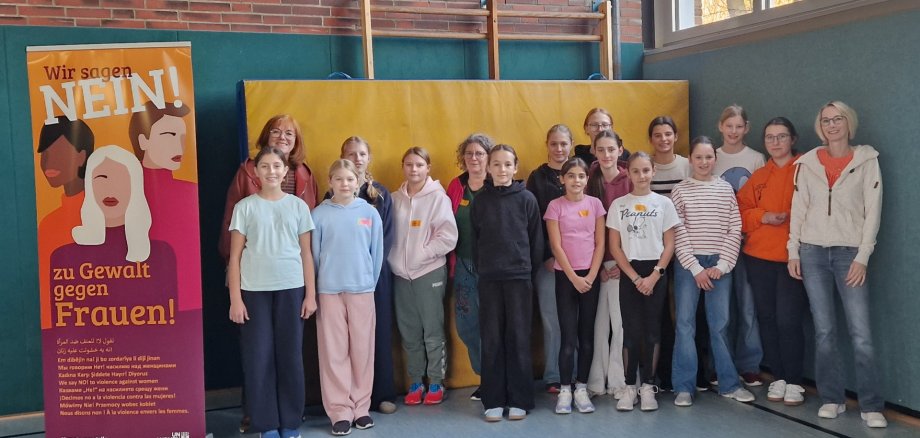
Standing up for oneself in threatening or conflict-ridden situations, setting clear boundaries, and building self-confidence: This was the theme of a two-day self-assertion and self-defense course for girls held last weekend in Kevelaer. Under the guidance of instructor Britta Tiggelkamp, 14 participants aged 12 to 15 took part in the training.

The program was organized by Christiane Peulen, the equal opportunity officer for the pilgrimage town of Kevelaer, in cooperation with the Roundtables for a Violence-Free Home in the Kleve district, the secondary schools in Kevelaer, and the Kleve District Police Department. The course was financially supported by the Ministry for Children, Youth, Family, Equality, Refugees, and Integration of the State of North Rhine-Westphalia.

Voice, Body Language, and Clear Boundaries

The training focused not only on learning practical self-defense and escape techniques. Above all, the girls practiced being mindful of their surroundings, carrying themselves with confidence, and recognizing and clearly communicating their own boundaries early on. In doing so, they learned to use their voices and body language effectively to confidently set their personal boundaries and stand up for them when interacting with others.

The hands-on training was supplemented by important prevention work: Stefanie Bodden-Bergau from the Kleve District Police Department—who is responsible there, among other things, for addressing sexual violence against women and children—provided the young people with comprehensive information about the dangers and ways to protect themselves. The participants showed great interest and took the opportunity to ask the expert numerous questions.

Another course is already in the planning stages

At the end of the weekend, the organizers gave the event an all-around positive review. “The girls once again participated in the exercises with great enthusiasm and dedication and put what they learned into practice very well,” agreed Christiane Peulen, Britta Tiggelkamp, and Stefanie Bodden-Bergau. Due to high demand, another session of the course with the schools in Kevelaer is already planned for the near future.

No employees found.

Help with accessibility

  • General

    We endeavor to make our websites accessible. You can find details on this in our accessibility statement. You can send us suggestions for improvement via our feedback form Report accessibility.

  • Font size

    To adjust the font size, please use the following key combinations:

    Larger

    ⌘command
    +

    Smaller

    ⌘command
    –

    Larger

    Ctrl
    +

    Smaller

    Ctrl
    –
  • Keyboard navigation

    Use TAB and SHIFT + TAB to navigate through next/previous links, form elements and buttons.

    Use ENTER to open links and interact with elements.

  • Contrast mode

    Press the following key combination to reduce or increase the contrast:

    Enlarge

    ⌃control
    ⌥option
    ⌘command
    .

    Decrease

    ⌃control
    ⌥option
    ⌘command
    ,
    Note: The shortcuts must be activated in the system settings of the operating system.

    Press the left ALT key + left SHIFT key + PRINT to quickly switch the high contrast mode on or off.

  • Invert colors

    Press the following key combination to switch the color inversion on and off:

    ⌃control
    ⌥option
    ⌘command
    8
    Note: The shortcuts must be activated in the system settings of the operating system.

    First activate the screen magnifier and then switch the color inversion on and off with the following key combinations:

    1. screen magnifier

    +

    2. invert colors

    Ctrl
    Old
    I
  • Screen magnifier

    Press the following key combinations to use the screen magnifier:

    Switch on/off

    ⌥option
    ⌘command
    8

    Enlarge view

    ⌥option
    ⌘command
    =

    Reduce view

    ⌥option
    ⌘command
    –
    Note: The shortcuts must be activated in the system settings of the operating system.

    Switch on / Enlarge view

    +

    Reduce view

    –