


City administration building of the Stadtkevelaer

Jobcenter Kevelaer

Career orientation event organized by the Jobcenter

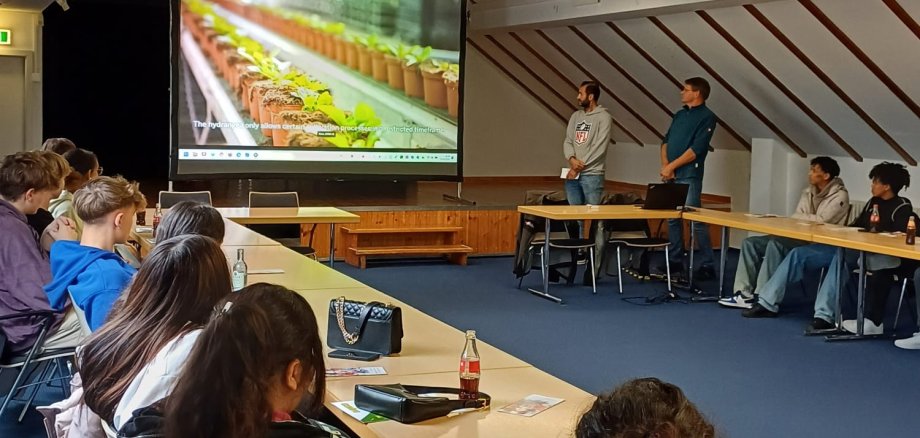
On 14.10.2024, the Jobcenter Kevelaer, represented by Thorsten Stern and Carolin Backus (trainee administrative assistant), hosted an event on the topic of career guidance. Svenja Baaken from the city of Geldern and Saskia Elders from the district of Kleve (KIM - Kommunales Integrationsmanagement) also took the opportunity to attend.

Around 20 young people looking for an apprenticeship who will be leaving school in the near future gathered in the public meeting place at 09:00. In a cozy and relaxed atmosphere with coffee and cola, interesting companies were presented by employees and trainees at hourly intervals.

The companies represented were Landmaschinen Greving GmbH, Pellens Hortensien GmbH, Fonteyne Tief- und Straßenbau GmbH, Helmut Brouwers GmbH and Onergys GmbH. The professions were presented to the young people in an appealing way and at eye level. Interested parties had the opportunity to ask questions and inquire directly about possible internships. A complete success!

No employees found.

Help with accessibility

  • General

    We endeavor to make our websites accessible. You can find details on this in our accessibility statement. You can send us suggestions for improvement via our feedback form Report accessibility.

  • Font size

    To adjust the font size, please use the following key combinations:

    Larger

    ⌘command
    +

    Smaller

    ⌘command

    Larger

    Ctrl
    +

    Smaller

    Ctrl
  • Keyboard navigation

    Use TAB and SHIFT + TAB to navigate through next/previous links, form elements and buttons.

    Use ENTER to open links and interact with elements.

  • Contrast mode

    Press the following key combination to reduce or increase the contrast:

    Enlarge

    ⌃control
    ⌥option
    ⌘command
    .

    Decrease

    ⌃control
    ⌥option
    ⌘command
    ,
    Note: The shortcuts must be activated in the system settings of the operating system.

    Press the left ALT key + left SHIFT key + PRINT to quickly switch the high contrast mode on or off.

  • Invert colors

    Press the following key combination to switch the color inversion on and off:

    ⌃control
    ⌥option
    ⌘command
    8
    Note: The shortcuts must be activated in the system settings of the operating system.

    First activate the screen magnifier and then switch the color inversion on and off with the following key combinations:

    1. screen magnifier

    +

    2. invert colors

    Ctrl
    Old
    I
  • Screen magnifier

    Press the following key combinations to use the screen magnifier:

    Switch on/off

    ⌥option
    ⌘command
    8

    Enlarge view

    ⌥option
    ⌘command
    =

    Reduce view

    ⌥option
    ⌘command
    Note: The shortcuts must be activated in the system settings of the operating system.

    Switch on / Enlarge view

    +

    Reduce view