


City administration building of the Stadtkevelaer

park

New digital parking guidance system starts trial operation

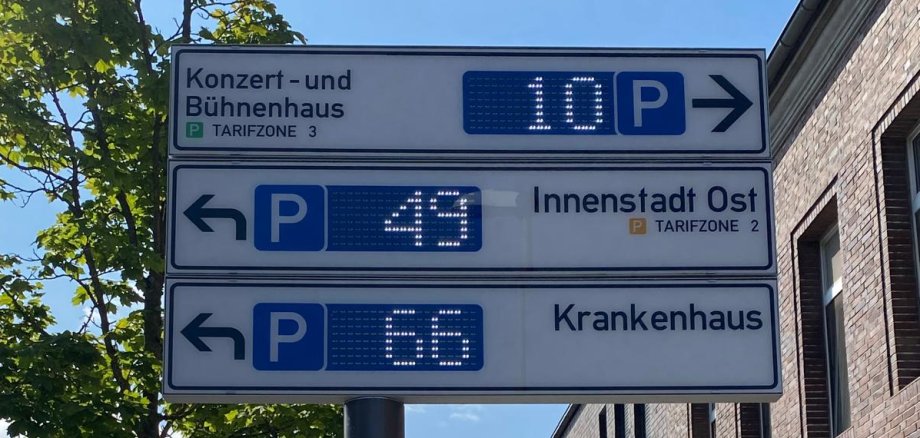
On July 9, 2025, we launched the two-week trial operation of our new digital parking guidance system. We want to use it to reduce search traffic in the city center and make it easier for everyone who is out and about in Kevelaer - whether as a citizen or a guest.

Parking with a system - live and clear

We have installed digital display boards at around 60 locations in the city. They not only show the names and locations of our public parking spaces, but also - in the city center - the current number of free parking spaces in real time.

In total, the new system records around 1,000 parking spaces in 12 parking lots.

Smart technology, anonymous data

To ensure that the occupancy figures are displayed reliably, we use two different types of sensor:

  • Camera sensors that use a stored parking space grid to detect whether a parking space is free or occupied.
  • Ground sensors, which are used where external influences such as shadows make camera measurement difficult.

Important: All data is processed completely anonymously - no personal data is collected or stored.

Not all boards are active yet - but we are working on it

A few locations are currently still under construction:

  • Egmontstraße / Blumenstraße: The electricity connection will be installed as part of the Blumenstraße sewer construction project.
  • Marktstraße: The installation is part of the redesign of Peter-Plümpe-Platz.
  • JVZ parking lot: Cameras and the parking machine are still missing here.

What comes next?

After the trial operation, we will make the final optimizations. The commissioning of all tested panels is planned for July 30, 2025.

Supported by the state of NRW

The implementation of our digital parking guidance system is supported by the state of North Rhine-Westphalia via the funding guideline for municipal road construction.


No employees found.

Help with accessibility

  • General

    We endeavor to make our websites accessible. You can find details on this in our accessibility statement. You can send us suggestions for improvement via our feedback form Report accessibility.

  • Font size

    To adjust the font size, please use the following key combinations:

    Larger

    ⌘command
    +

    Smaller

    ⌘command

    Larger

    Ctrl
    +

    Smaller

    Ctrl
  • Keyboard navigation

    Use TAB and SHIFT + TAB to navigate through next/previous links, form elements and buttons.

    Use ENTER to open links and interact with elements.

  • Contrast mode

    Press the following key combination to reduce or increase the contrast:

    Enlarge

    ⌃control
    ⌥option
    ⌘command
    .

    Decrease

    ⌃control
    ⌥option
    ⌘command
    ,
    Note: The shortcuts must be activated in the system settings of the operating system.

    Press the left ALT key + left SHIFT key + PRINT to quickly switch the high contrast mode on or off.

  • Invert colors

    Press the following key combination to switch the color inversion on and off:

    ⌃control
    ⌥option
    ⌘command
    8
    Note: The shortcuts must be activated in the system settings of the operating system.

    First activate the screen magnifier and then switch the color inversion on and off with the following key combinations:

    1. screen magnifier

    +

    2. invert colors

    Ctrl
    Old
    I
  • Screen magnifier

    Press the following key combinations to use the screen magnifier:

    Switch on/off

    ⌥option
    ⌘command
    8

    Enlarge view

    ⌥option
    ⌘command
    =

    Reduce view

    ⌥option
    ⌘command
    Note: The shortcuts must be activated in the system settings of the operating system.

    Switch on / Enlarge view

    +

    Reduce view