


City administration building of the Stadtkevelaer

current

More safety at the station: new women's parking spaces in Kevelaer

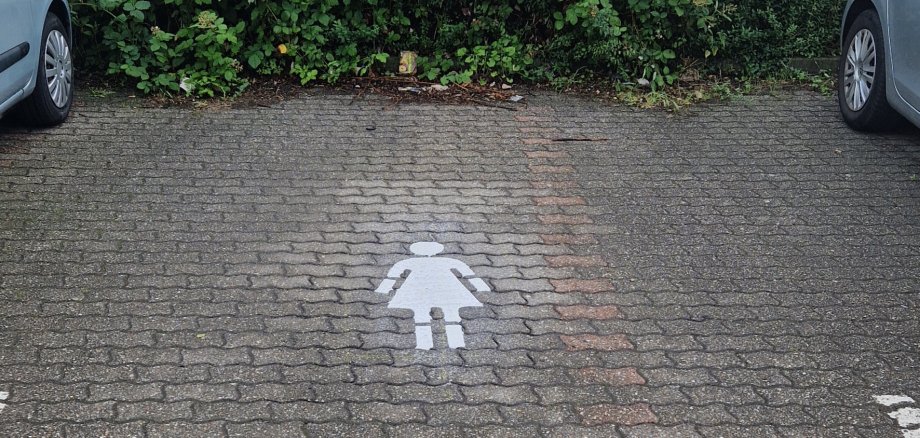
Since the beginning of June, four newly designated women's parking spaces have been available at Kevelaer station. The parking spaces were deliberately set up in the immediate vicinity of the platforms - on both sides of the tracks - to provide a better sense of security, especially in the evening hours.

Short distances, better lighting, more safety
The women's parking spaces are well lit and are located directly at the central crossings and near the bicycle stands. The aim of the measure is to make the route from the platform to the car as short and safe as possible for women.

A joint project for more safety in everyday life
The project was initiated by Christiane Peulen, Equal Opportunities Officer for the pilgrimage town of Kevelaer, who provided an important impetus. "Women are demonstrably more frequently affected by sexual harassment and assault - especially in the evening. We want to actively counter this feeling of insecurity with shorter distances and visible shelters," said the representative.

Mayor Dr. Dominik Pichler supports the initiative
"What many people take for granted - the journey from the train to the car - can make others feel uncomfortable. That's why it's important that we act as a city and create concrete improvements."

The municipal utilities, the municipal depot and the equal opportunities office worked closely together to implement the project.

Note: The parking spaces are currently marked by floor markings. Additional signage will follow shortly.


No employees found.

Help with accessibility

  • General

    We endeavor to make our websites accessible. You can find details on this in our accessibility statement. You can send us suggestions for improvement via our feedback form Report accessibility.

  • Font size

    To adjust the font size, please use the following key combinations:

    Larger

    ⌘command
    +

    Smaller

    ⌘command

    Larger

    Ctrl
    +

    Smaller

    Ctrl
  • Keyboard navigation

    Use TAB and SHIFT + TAB to navigate through next/previous links, form elements and buttons.

    Use ENTER to open links and interact with elements.

  • Contrast mode

    Press the following key combination to reduce or increase the contrast:

    Enlarge

    ⌃control
    ⌥option
    ⌘command
    .

    Decrease

    ⌃control
    ⌥option
    ⌘command
    ,
    Note: The shortcuts must be activated in the system settings of the operating system.

    Press the left ALT key + left SHIFT key + PRINT to quickly switch the high contrast mode on or off.

  • Invert colors

    Press the following key combination to switch the color inversion on and off:

    ⌃control
    ⌥option
    ⌘command
    8
    Note: The shortcuts must be activated in the system settings of the operating system.

    First activate the screen magnifier and then switch the color inversion on and off with the following key combinations:

    1. screen magnifier

    +

    2. invert colors

    Ctrl
    Old
    I
  • Screen magnifier

    Press the following key combinations to use the screen magnifier:

    Switch on/off

    ⌥option
    ⌘command
    8

    Enlarge view

    ⌥option
    ⌘command
    =

    Reduce view

    ⌥option
    ⌘command
    Note: The shortcuts must be activated in the system settings of the operating system.

    Switch on / Enlarge view

    +

    Reduce view